
iPaaS platform / Flow Monitoring
Know what every flow is doing.
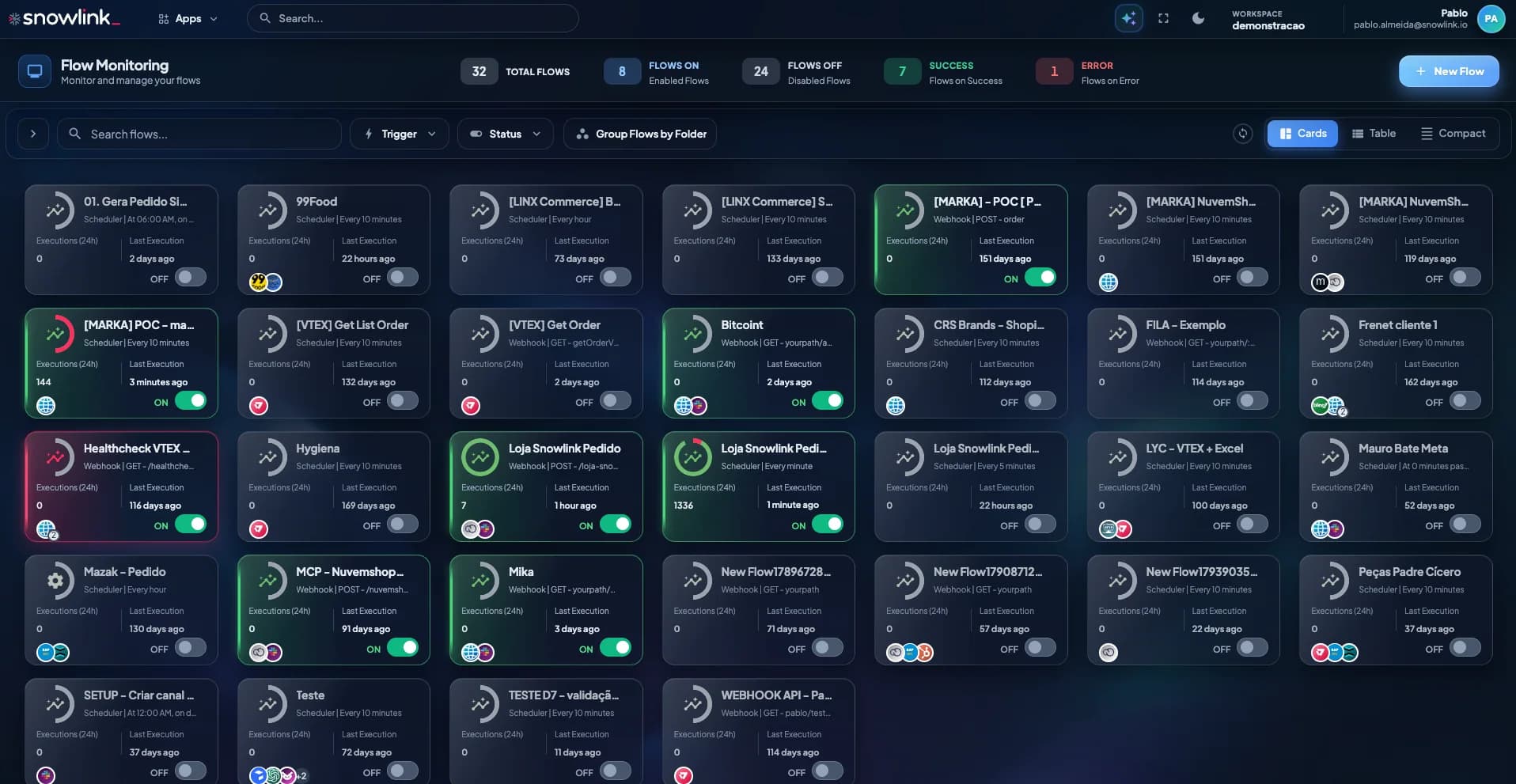
Flow Monitoring shows the state of all your flows at a glance: how many are on, which succeeded, which failed, and the history behind each one.
Try it
Switch a flow on or off.
The counters at the top react to every switch, like the real panel.
- Total flows
- 6
- Flows on
- 3
- Flows off
- 3
- On success
- 2
- On error
- 1
orders → erp
Scheduler · recurring
Onstock → marketplace
Scheduler · recurring
Oninvoice → store
Webhook · on request
Oncustomers → crm
Scheduler · recurring
Offpayments → erp
Webhook · on request
Offcatalog → store
Scheduler · recurring
Off
Use the switches to turn flows on and off.
Interactive illustration with example flows. Not product data.
What it does
Operate flows without opening them.
Fleet KPIs
Total, on, off, success and error flows summarized at the top of the panel.
A card per flow
Trigger, executions, last execution and an on/off switch on every card.
History and logs
Jump from a card to the execution history and the logs behind it.
Works with
Modules that complete this one.
Put it to work on your stack.
Tell us which systems you run today and we will show how this module fits in.